John Deere S700 Series Ground Speed Automation
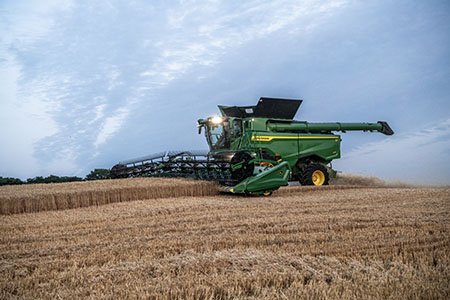
Raise your combine’s productivity Up to 20 percent with Predictive Ground Speed Automation
Focus less attention towards controlling combine speed and more on other harvesting tasks with Ground Speed Automation
Ground Speed Automation dynamically adjusts combine ground speed during harvest based on various operator inputs and internal sensors around the machine. These sources are continuously evaluated and executed upon to command a harvesting speed:
- Terrain – Adjusts ground speed according to combine pitch
- Previous coverage – Increases ground speed for areas already harvested
- Grain Loss level – Quicker reaction of ground speed to changes in grain loss
- Engine power limit – Adjusts ground speed to maintain user defined engine power target
- Header height changes – Adjusts ground speed dependent on header height. Raising will incrementally increase ground speed, lowering will decrease
- Ground speed limit – Maximum harvesting ground speed threshold predefined by operator
Transition the traditional mindset from harvesting at a fixed speed, thereby feeding varying crop throughput, to instead a more productive viewpoint of maintaining consistent throughput by varying the machine’s ground speed proportionally with using automation. This, along with focusing less on controlling speed and more on other harvesting tasks, is the value achieved with Ground Speed Automation.
NOTE: A ProDrive™ or ProDrive XL Transmission is required to use Ground Speed Automation. Upon selecting this transmission, Ground Speed Automation is included from factory with any Connectivity and Technology Package.
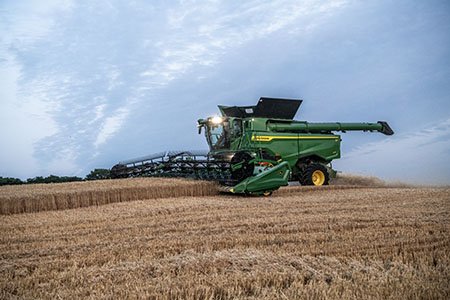
Ground Speed Automation continuously evaluates multiple inputs while harvesting to dynamically adjust the combine’s ground speed
What’s New and Improved?
- Three unloading on-the-go speed modes to select from: Variable, Offset, or Fixed
- Ready to go! Eliminated the time-consuming system prerequisite to set an initial performance target to baseline. Allows quicker utilization of automation for customers and on-going learning through various field conditions.
- More inputs added for evaluating ground speed commands including terrain, header height changes, and previous coverage
- Enhanced responsive to grain loss detections
- With Ground Speed Automation on, utilize more engine rated power while maintaining threshing and separating results as components operate at designed speeds. NOTE: Operator cannot set engine power target above 100 percent
- Ground speed adjustments are signified to the operator in blue text when automation is making changes
- Updated status and diagnostic features for better understanding system performance and troubleshooting
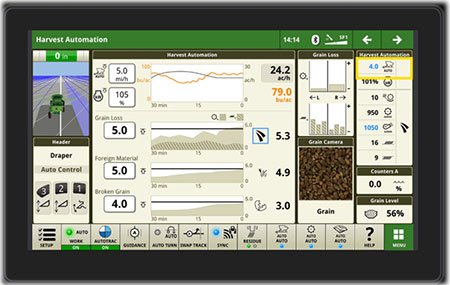
Harvest Automation factory default run page for model year 2025 combines on G5Plus CommandCenter™ Display
Highlighted in the top right corner of image is ground speed. Similar to other operations, output is indicated in blue text because automation is on and in control.
Choose the Unloading On-the-go Mode that fits your operation

Unloading on-the-go boosts harvesting productivity
Three different unloading on-the-go modes are available for the combine operator to select from: Variable, Offset, or Fixed. Ground Speed Automation will react differently in each mode whenever the combine is unloading:
- Variable: Whenever the unloading auger is engaged, Ground Speed Automation will continue to vary ground speed.
- Offset: Whenever the unloading auger is engaged throughout the entire field, Ground Speed Automation will slow down by the value entered by the operator and then hold the fixed speed.
- (As an example if the combine operator has entered an offset of 1 km/h and the combine is travelling at 5 km/h prior to unload, once the unloading auger is engaged, then the combine’s ground speed will slow down to 4 km/h and hold until unloading has completed.
- Fixed: Whenever the unloading auger is engaged throughout the entire field, Ground Speed Automation will maintain a constant, fixed speed which the operator has entered. This may be a slower or faster speed than the combine is travelling just before unloading auger is engaged.
Viewing from an overall field or harvest season perspective, greatest productivity gains with utilizing Ground Speed Automation are expected with variable unloading on-the-go mode.
NOTE: With any of these three modes, Machine Sync can be utilized to synchronize the grain cart tractor speed with that of the combine, thereby reducing the stress and tensions of both operators involved while unloading on-the-go. However, it is recommended that Machine Sync is utilized with either offset or variable modes for better results and overall automation performance.
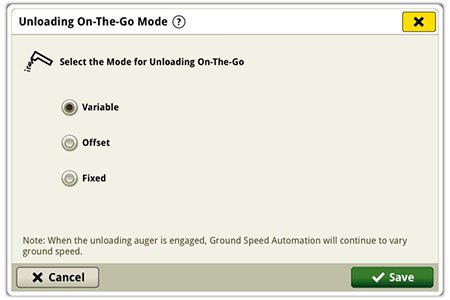
Unloading on-the-go mode selection on G5Plus CommandCenter Display
Steady threshing even at heightened power demands
When harvesting manually at full rated power (100 percent), if any tougher threshing areas are encountered requiring more power from the machine, this will cause the engine rpms to slow down and thus affecting the threshing components to operate at slower than optimal designed speeds. Ultimately resulting in either increased grain loss, reduced threshing quality, or combination of mixed results.
However when utilizing Ground Speed Automation, up to 5 percent additional utilization of rated power is made available (note that the combine operator can only set engine power limit up to 100 percent) as needed. Therefore in the same scenario if power demands fluctuate slightly above 100 percent, operators will feel no sudden transition as the machine’s engine rpms will maintain through these areas of higher demand all-the-while operating at designed threshing speeds. Operators utilizing ground speed automation at maximum rated power levels will appreciate this smooth harvesting experience and achieve greater productivity out of the gate from a base level automation offering.
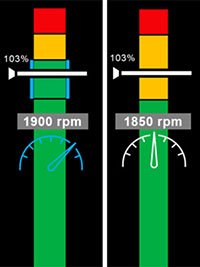
System behavior harvesting in manual mode (right) at a scenario of 103 percent power versus system design with Ground Speed Automation on (left)
Note the extended rated engine power, the segment of blue and green to the left, will be shown on the primary display to the operator whenever Ground Speed Automation is engaged.