John Deere S7 Series Harvest Automation
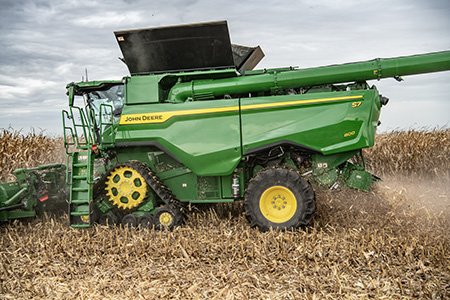
John Deere S7 Combine Harvest Automation What’s New and Improved?
- Harvest Automation default runpage on G5Plus CommandCenter Display incorporated with Harvest Settings Automation functionality. This enables combine operators with greater visibility and control of automation applications from a single view.
- Additional automation module options of varying sizes available for operators to customize display run pages to their user preferences.
- Shifts the operator mindset to focus on harvesting outcomes rather than adjusting the actual combine settings themselves. Operators define targeted system performance with input of foreign material, broken grain, and grain loss acceptance limits
- View live machine productivity and crop yield readings as well as a 15-minute time history graph of harvest performance
- Ready-to-go! Get to using automation sooner with elimination of the previous requirement to set a performance target prior to using automation
- Easier and faster to optimize combine with localized recommended starting settings and acceptance limits provided based upon crop type, and machine type, and geography.
- All setting adjustments by automation are notified in blue text along with an identifying icon sharing the reason for the setting change
- Updated status and diagnostic features for better understanding system performance and troubleshooting
- Clean grain bypass housing redesign to better represent light foreign material (white caps, pods, and small pieces of cob) to ActiveVision™ Cameras
- Functionality is unlocked with either a renewable Premium or Ultimate S7/X9 Combine License
- Increased visibility of foreign material composition and embedded tuning tool for accurate system response between unthreshed and material other than grain (MOG)
- Automatic cleaning shoe setting adjustments are activated whenever crossing into and exiting out of harvested ground
New, intuitive display interaction of automation features
All John Deere combines, model year 2025 and newer, will be delivered with harvest automation default run page on the G5Plus CommandCenter display regardless of the Connectivity and Technology Package level configured. This design allows the combine operator greater visibility to monitor and adjust automation performance from a single view during harvest instead of repetitively cycling back and forth between runpages.
NOTE: This section focuses on the harvest automation run page from factory to provide general awareness about its design and the information provided to the operator. There are additional harvest automation modules available to customize a new display run page design to the operator’s preference.
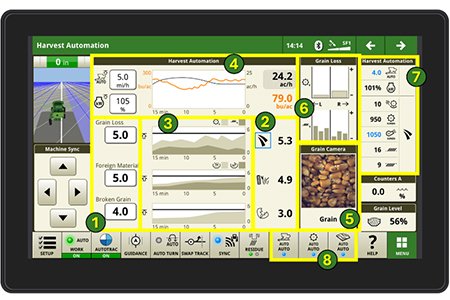
Run page design elements (referencing above image):
-
Acceptance Limits for grain loss, foreign material, and broken Select each box to adjust the unitless value.
-
Current readings of grain loss, foreign material, and broken grain. Note in this image the grain loss icon is boxed in blue as automation is making a setting change due to the current reading exceeding the set limit value
-
Time history graph performance of the past 15 minutes for grain loss, foreign material, and broken The solid black line along the top indicates the set limit threshold. With this, you can easily understand performance trends across each harvest outcome and results after setting adjustments occur.
-
View machine productivity (black) and crop yield (orange) readouts as well as a time history graph of how they have trended over the past 15 Also on the left-hand side, an operator can input maximum ground speed limit and maximum engine power limit
-
Live camera viewing of grain samples within either the clean grain elevator and/or tailings elevator by ActiveVision This visual tool continuously displays scans of passing grain samples and will highlight any broken and unthreshed grain as well as foreign material detected. With this viewing capability, operators from inside the cab will understand what automation is measuring within the combine, the ability to observe changing results whenever settings adjustments occur, and ensure grain quality results desired.
-
Grain loss distribution readout, shown here for a X Series Top half displays separator grain loss across left and right rotor (NOTE: S Series does not display rotor loss distribution due to single rotor design) and bottom half shows grain loss measurements across the cleaning shoe, left and right (NOTE: X Series has 6 shoe sensors, S Series has 4 shoe sensors)
-
Ordering: Current ground speed (top), engine power level (next below), then the suite of combine harvesting settings. For each row, whenever the value is shown in black text and without any icon shown directly to the right, then automation is on and active but no adjustments are occurring. However, whenever an adjustment is being made by automation, the readout changes to blue text along with an identification icon to the right sharing the reason why for the setting adjustment. This image details an example of fan speed being adjusted to 1050 rpm because grain loss has exceeded the acceptance limit which the operator had predefined.
-
Automation status LED diagnostics. Three shortcut keys are being shown, one for each automation system.
BLUE = Automation System actively sensing, deciding, and/or acting
GREEN = Automation System ready to sense, decide, and/or act – waiting for engagement
ORANGE = Automation System could have an issue or do a better job of sensing, deciding, and/or acting - action needed to resolve
RED = Automation System is faulted and not sensing, deciding, and/or acting - action needed to resolve
GRAY = Automation System OFF or crop type not supported
Begin harvest with tailored acceptance limit ranges and localized starting setting recommendations
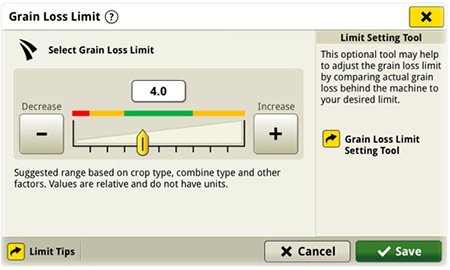
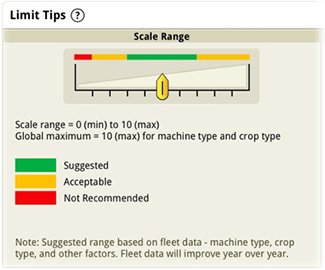
Harvest Settings Automation enables optimizing the combine faster and easier by providing starting acceptance limit ranges for each harvesting outcome: grain loss, foreign material, and broken grain. From in-field validation and internal research and development findings from previous harvest seasons, a color guided scale (as shown below) visually advises the suggested ranges for setting each acceptance limit. This recommendation scaling differs based upon the crop type selected and combine type utilized.
Display interaction to adjust Grain Loss Acceptance Limit (increase/decrease)

Explanation of limit scale range coloring
Notes and advised tips regarding acceptance limits:
- Limits range from a scale of 0.1 (min) to 10 (max) and are relative numbers- they DO NOT represent any perceived measurement such as grain loss percent or tons per hectare, as examples. Selecting the plus or minus buttons as in the above image will change the acceptance limit number.
- When adjusting, it is advised to begin from the higher end of the color band and incrementally decrease until meeting satisfactory results.
- It is still required to ground truth results for ensuring acceptable limits meet customer outcomes.
Example: If a customer is harvesting with a current grain loss value of four, gets out and ground truths using the grain loss calculator within Equipment Mobile and discovers a grain loss twice the amount that they desire, then the operator should reduce their acceptable limit by half or down to two, continue harvest, and ground truth again to verify. - Acceptable limits may vary, even by 0.1 magnitudes, across identical machines within the same fleet or harvesting from one field to the next.
- Setting very low acceptance limits in all categories is possible, but combine would be required to operate at slower than desired speeds to satisfy inputs. Keep in mind there is a tradeoff between productivity and acceptance limit results.
Also, Harvest Settings Automation enables optimizing the combine faster and easier with also providing localized starting settings versus traditionally used universal crop type defaults. These initial settings are dependent upon crop type, combine type, and geography. Within Harvest Setup page of the G5Plus CommandCenter Display, selecting “suggested defaults” will apply these starting setting recommendations. Operators can adjust from these starting settings for their specific fields.
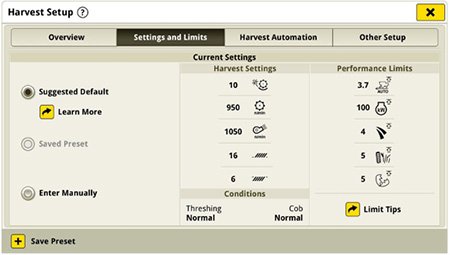
Harvest setup window from G5Plus display. Selecting Suggested Default prepares combine by enabling starting setting recommendations.
More customized control over automation outcomes
In certain harvesting scenarios, its sometimes necessary to keep a specific combine setting fixed or manually controlled for maintaining desired grain quality results. One such example may be to manually fix the concave clearance in corn so that automation doesn’t alter the clearance while executing through its checklist of cadenced adjustments in attempt to restore an exceeded limit, whereby possibly introducing another concern such as broken grain. Within the Harvest Settings preferences page, the operator can uncheck specific settings to change control into manual mode and therefore restricts automation from making adjustments to that functional area.
If automation is believed to be making changes too frequently to the operator’s liking, switching certain settings to manual is a better practice versus turning off the overall system entirely. Harvest Settings Automation will still optimize the combine to the customer’s outcome amongst the remaining settings during harvest leading to better results and improved quality.
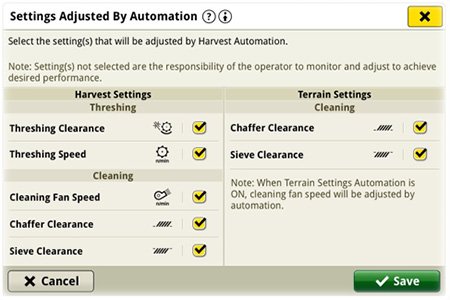
An operator can select the specific settings within functional categories that can be adjusted by Harvest Settings Automation
NOTE: The system is designed so that only one threshing and one cleaning setting can be set to manual within each category. If threshing clearance is disabled above for example, you cannot also disable the threshing speed. If the chaffer clearance is disabled, you cannot also disable either the sieve clearance or the cleaning fan speed. This is designed as such in order to provide the system with sufficient possible combine setting changes to meet the user’s desired performance inputs.
Reduce grain loss with automatic cleaning shoe adjustments across the entire field – even headlands
The harvesting job performed by the combine regularly passes in and out of areas already harvested (headlands). With expanded functionality of Harvest Settings Automation, the combine will now automatically adjust internal settings across the entire field, beyond just in standing crop! This capability will reduce the potential risk of grain loss sourced from the cleaning shoe by having dynamic responses to tapering (i.e. headland entering) or ramping (i.e. headland exiting) crop throughput levels instead of maintaining settings for high throughput for the entire field. Specifically, the automated cleaning shoe setting adjustments are the combine areas of fan speed, sieve clearance, and chaffer clearance.
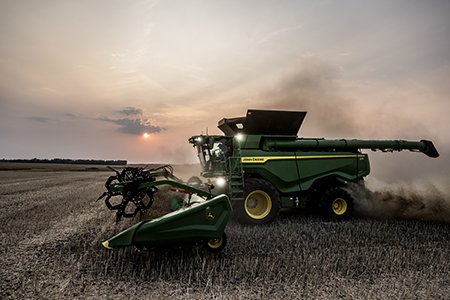
Out-of-crop adjustments are automatically applied as the combine finishes a crop row pass and enters the headland
When adjust settings for out of crop is turned on in Harvest Settings preferences, a default set of offset adjustments unique to crop type are queued across the three cleaning shoe settings. Whenever the combine moves into an area of harvested crop (headlands), the combine will automatically apply these offsets. Then, when the combine exits the area to begin a new crop pass, the offsets are lifted, restoring the settings for productive work. By default, offsets are preset based on crop type acquired through learnings during in-field testing and customer feedback. However, the operator can modify the offset magnitude to select larger or smaller incremental changes (such as faster/lower rpm or wider/narrower clearances). Selecting a value of zero will apply no offset to that individual setting.
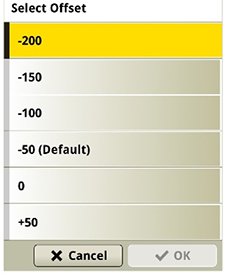
Selection of fan speed offset, decreasing by 200 rpm. This offset will be applied whenever the combine enters areas of harvested crop
Whenever any of these cleaning shoe offsets are applied, a new reasons for change icon will appear on the Harvest Automation run page. This shows the operators not just what is happening and when, but why the combine’s settings are automatically adjusting. This new feature will contribute to a more efficient harvest, especially as the combine automates routine, repetitive tasks so the operator can focus on more critical tasks, such as feeding or surveying headland surroundings for the initiated turn.
Cross Implement - The Mark of Quality Equipment
Your Local John Deere Dealer Serving You From Central Illinois
Looking For a Traditional John Deere Dealership?
Remember When You Could Drive or Call Your Local Dealer and Get the Parts, Service & Equipment You Were After at One Spot?
We Serve You | We are on a Unique Path in Modern Times Our Single Location Allows Us to Focus on You Our Customer
We Have What You Need | Equipment & Parts Inventory are Sourced Out of Our Single Location: We Are Open 6 Days a Week Year Round No Run Around They are OnSite OnDemand with NextDay Shipping Available
We Invest in Equipment | Our Equipment is Inspected, Reconditioned, Serviced & Detailed, Come Take a Look You Will See the Difference.
We Have the People | Our Team Members Participate in Double the Annual Training versus that of the Average Dealer. Pair that with One of the Lowest Employee Turnover Rates in the Industry and Get Served by the Best Trained & Most Experienced Team.
We're Not Better Than Any Other Dealership We Just Try Harder | We have grown in Scale to One of the Largest John Deere Ag Locations in North America by Daily Serving You Our Customer
Experience the Difference Today
• John Deere Since 1837 •